



Lexa ERP · Distribution

Distribution software for wholesalers and distributors in Tunisia

Take control of your business. Cut your losses.

Trucks, counter, phone orders: everything is recorded at the moment of sale. Every evening you know what went out, what is missing and who owes you how much.

Real screenshots of the software, demo data.

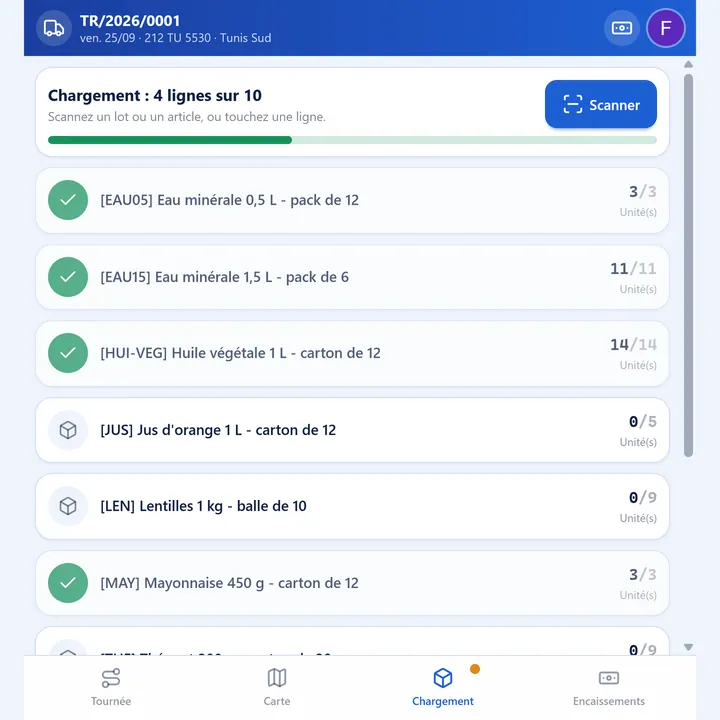
Lexa driver screen: truck loading checked line by line before departure
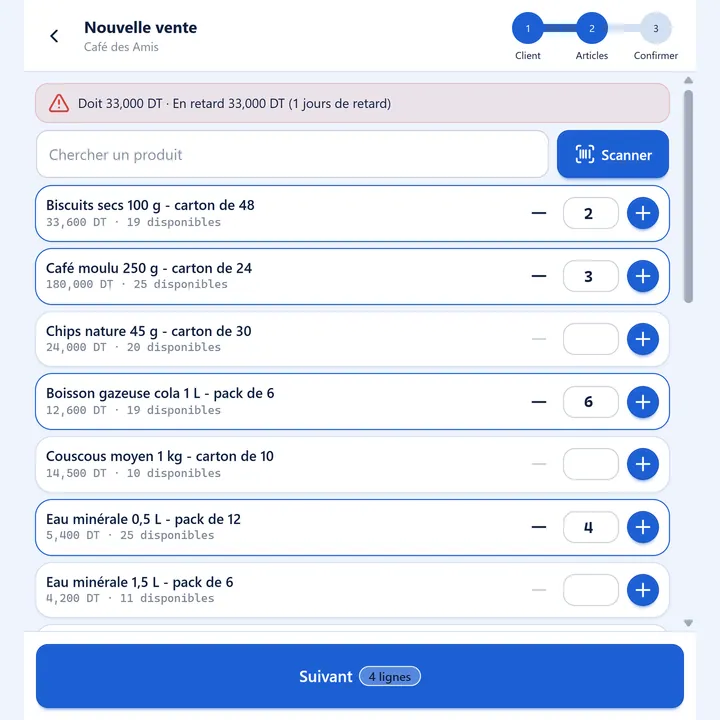
Sale on the road in Lexa: truck items with available stock and the customer's balance alert
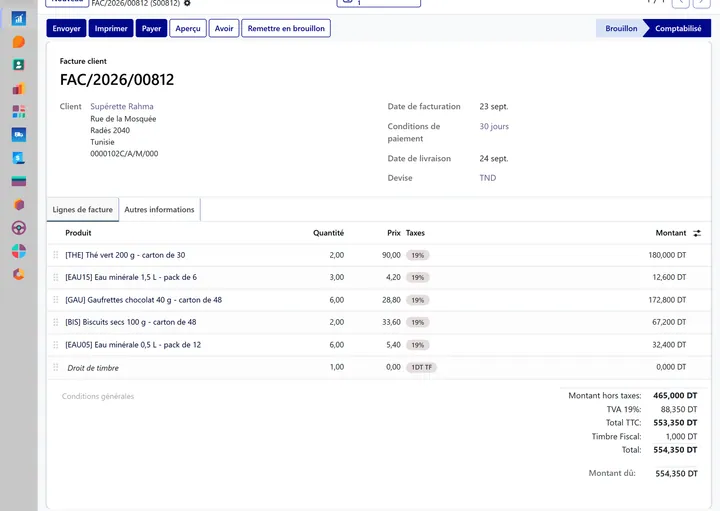
Lexa ERP customer invoice with 19% VAT and stamp duty

In brief

Lexa ERP for distribution is management software built for Tunisian wholesalers and distributors who sell in three ways: orders taken by phone and delivered on a round, direct sales from the truck (van sales) and sales at the warehouse counter. Every sale updates stock, the invoice (VAT and stamp duty included) and the cash position at the same moment. The driver works on a simple screen on his phone: loading checked, delivery, invoice on the spot, payment in cash, by cheque or by bill of exchange, and a count of the truck in the evening with a reason for every discrepancy. Management follows sales by channel, receivables by age and losses valued at cost on one dashboard. Lexa ERP is published in Tunis by Lexa Technologies; pricing is quoted after a free audit.

Three ways to sell, one system

No more notebooks, no more double entry: every sale updates stock, the invoice and the cash position immediately.

  1. Order

    by phone

    The customer calls, the office enters the order, the truck delivers. Delivery is proven: no more « I never received anything ».

  2. Truck

    van sales

    The driver sells and invoices on the spot. In the evening you know what was sold, collected and left in the truck.

  3. Counter

    at the warehouse

    The same simple screen as the drivers. Every sale is invoiced: nothing leaves without being recorded.

What most wholesalers live with

The same problems come up among distributors still working with notebooks, Excel or a stand-alone point-of-sale program.

  • Goods disappear without explanation

    The truck comes back, and the discrepancy is only found at the month-end stocktake, when nobody knows what happened any more.

  • Nobody knows exactly who owes how much

    Tabs live in notebooks and pending cheques in a drawer: follow-ups come too late, or not at all.

  • The driver's cash does not reconcile

    Cash, cheques, credit granted on the road: rebuilding the day in the evening takes time and leaves gaps.

  • The same sale is entered twice

    The truck notebook, then the office software: every re-entry is a chance for error and a wrong stock figure.

  • Phone orders get lost

    Written on a scrap of paper, they go in the wrong truck, in the wrong order, or not at all.

  • The figures arrive too late

    The owner discovers his sales, losses and unpaid invoices the following month, when it is too late to act.

Guided tour, screen by screen

A wholesaler's day in Lexa, from the counter to the dashboard. Click a screenshot to enlarge it.

Real screenshots from the Lexa ERP demo. The companies, customers and amounts shown are fictitious.

Step 1

At the counter: a sale in three steps

The walk-in customer picks the cartons, the salesperson confirms, the customer pays. At the warehouse counter, the salesperson uses exactly the same screen as the drivers: the order, the stock movement and the invoice are done in one step, before the customer walks out of the door.

  • Warehouse stock shown live, item by item
  • Compliant invoice immediately: VAT and stamp duty included
  • Payment in cash, by cheque or on credit for account customers
  • « My day »: the cash to hand in each evening, by payment method

1. The customer picks
Lexa counter sale screen: list of items with available stock and a scan button
2. The salesperson confirms
Counter sale summary: items, amount before tax, VAT and total
3. The customer pays
« My day » screen at the counter: sale paid, invoice available and the day's cash

Step 2

From the phone to the truck, without paper

The customer calls and the office enters the order with its prices, taxes and the customer's payment terms. The dispatcher puts it on a delivery round: Lexa suggests the order of stops, checks that the truck is not overloaded and takes each customer's receiving hours into account. The driver finds the round, the map and the amount to collect on his phone.

  • Customer order with prices, VAT and payment terms
  • Suggested order of stops, truck load checked by weight and volume
  • Customers' receiving hours taken into account
  • Printable route sheet and map on the driver's phone
The order entered at the office, with the customer's terms.
Customer sales order in Lexa ERP: items, unit prices, VAT and payment terms
The round: stops, truck load and amount to collect.
Delivery round planning in Lexa: truck, zone, stops, weight and amount to collect
The driver's map (© OpenStreetMap)
Round map on the driver's phone with numbered stops around Tunis

Step 3

Loaded, delivered, proven

In the morning the driver checks the load line by line, by scanning or by tapping: the round does not leave until the truck matches the delivery notes. At the customer's, he delivers; if something is missing, the screen asks why. Each stop records its arrival time, its end time and the name of the person who received the goods. In the evening the round is closed with the money collected against what was expected.

  • Load checked before departure, discrepancy by discrepancy
  • Partial delivery possible, with a reason for each missing item
  • Payment collected on the spot: cash, cheque, bill of exchange or card
  • Proof of delivery: time and name of the person receiving
Load checked
Complete loading: ten lines out of ten checked, the truck can leave
Partly delivered, with a reason
Stop partly delivered: arrival time, person who received and missing item with its reason
Round completed
Round completed at 100%: stops delivered and amount collected against the amount expected

Step 4

Van sales: the truck becomes a shop

On the road, the driver sells what is in the truck. He picks the cartons by tapping or by scanning the barcode with the phone's camera; the screen warns him if the customer already owes money. One button creates the order, the movement out of the truck's stock and the invoice. Then he collects the payment, or leaves the sale on credit.

  • Truck stock live: he only sells what is on board
  • Barcode scanning with the phone's camera
  • Numbered invoice on the spot, VAT and stamp duty included
  • The customer's balance shown before the sale
1. He picks, the balance shows
Sale from the truck: customer balance alert and items with the stock available on board
2. He confirms
Confirming the sale on the road: items, VAT and total, stamp duty added to the invoice
3. He collects
Payment of the sale: cash, cheque or on credit, invoice available

Step 5

Does the customer owe money? The driver knows on the spot

In the customer list, the driver sees in red who owes money and for how many days. The customer's record shows the balance, the overdue amount and every open invoice. When the customer hands over a cheque, it is recorded with its number, its bank and its due date, and the balance updates immediately; the oldest invoices are settled first.

  • Overdue customers flagged in red, with the number of days
  • Balance, overdue amount and open invoices on the customer record
  • Cheque recorded with its number, bank and due date
  • Payment applied to the oldest invoices first
Who owes
Customer list on the driver's phone, with amounts owed and days overdue in red
The details
Customer record: balance, overdue amount and list of open invoices
Cheque received
Recording a cheque payment: amount, cheque number, bank and due date
Balance updated
Customer record after the payment: balance updated, old invoices settled

Step 6

In the evening, the truck is counted

At the end of the day, the driver counts what is left in the truck. The screen is pre-filled with what the system expects; for each discrepancy he must choose a reason: broken or damaged, expired, missing without explanation, counting or picking error, found. At the office the line appears at once: which truck, which product, when and why.

  • Pre-filled count: only the discrepancy needs entering
  • A mandatory reason for every discrepancy
  • Truck stock corrected the same evening
  • Discrepancies listed at the office by truck, product and reason
At the office, the same evening: each discrepancy with its truck, product and reason.
List of count discrepancies at the office: date, product, truck, reason and count reference
Why this discrepancy?
End-of-day truck count: expected quantity, counted quantity and reason for the discrepancy
Stock corrected
Truck stock corrected after the evening count

Step 7

The history of losses, product by product

Every count and every write-off feeds the history. The chart shows losses month by month and by reason; the table gives the amounts, valued at cost. A wholesaler finally sees where his goods go — breakage, expiry, missing items, picking errors — and what it costs him, truck by truck.

  • Losses valued at cost
  • Analysis by reason, month, truck and product
  • Quantities found again are deducted
Losses month by month, by reason.
Chart of stock losses by month and by reason in Lexa ERP
The amounts lost, valued at cost.
Table of losses valued by reason and month: broken, expired, missing, error, found

Step 8

Who owes what, and since when

The « Who owes what » table sorts receivables by customer and by age: not yet due, 1 to 30 days, 31 to 60, 61 to 90 days and more. In one click, the customer's account statement prints under your company's name, with every invoice, its due date and its delay, ready to be handed over by the driver or sent.

  • Aged balance by customer
  • Customer account statement as a PDF, on your letterhead
  • Overdue amounts visible before the next delivery
Receivables by customer and by age.
« Who owes what » table: receivables by customer, split between not due and overdue brackets
The account statement, in one click.
Customer account statement as a PDF: invoices, dates, due dates, days overdue and amounts due

Step 9

The owner's dashboard

A single screen brings together sales, with the share sold on the road and at the counter, the money collected, what customers owe and what is overdue. Gauges compare the overdue share and losses with the targets set. Below: sales by day and by channel, receivables by age and losses by reason. Every figure opens the documents behind it.

  • Sales, collections, receivables and overdue amounts for the month
  • Comparison with the previous month and with targets
  • One click on a figure opens the details
The month's indicators and their gauges.
Dashboard indicators: sales, road sales, collections, receivables, overdue amounts, losses
Sales by day and by channel.
Bar chart of sales by day and by channel: counter, van sales, delivered orders
Receivables by age, losses by reason.
Charts of receivables by age and stock lost by reason

Everything you need, in one tool

Ten modules sharing the same database: an item, a customer or a truck exists only once.

  • Sales

    Counter, road and delivered orders in a single database.

  • Delivery rounds

    Order of stops, truck load, receiving hours.

  • Driver screen

    Loading, delivery, sales, payment and counting on the phone.

  • Stock and loading

    The warehouse and each truck tracked as stock locations, live.

  • Detailed history

    Every movement and every discrepancy: which truck, when, why.

  • Compliant invoices

    VAT and stamp duty, continuous numbering.

  • Who owes what

    Balances, cheques and bills of exchange, aged balance by customer.

  • Purchasing

    Supplier orders and receipts that feed the stock.

  • Dashboard

    Sales by channel, collections, overdue amounts and losses.

  • Quick printing

    Invoices, delivery notes, statements and route sheets.

Why Lexa for distribution

Four concrete differences when it's time to choose.

  • One system for all three channels

    Counter, trucks and phone orders share the same stock, the same customers and the same invoices. What is sold on the road appears at the office instantly, with no transfer and no re-entry.

  • Built for credit sales in Tunisia

    Cheques with their number, bank and due date, bills of exchange, customer credit, stamp duty, account statements: Lexa follows money the way it really moves at a Tunisian wholesaler.

  • A screen drivers actually use

    Three steps to sell, the phone's camera to scan, a pre-filled count in the evening: the tool asks little effort of the people who use it most.

  • A team in Tunis

    Lexa sets the software up with your products, your customers and your trucks, trains your drivers and stays reachable in French and Arabic.

Pricing: on quotation, after a free audit

The price depends on your business: number of trucks and warehouses, counter sales, migration of your items and customers, documents to adapt. It is set after a free audit of your flows, with no commitment.

The model is that of Lexa ERP: a licence and annual maintenance in dinars, with no per-user fee. Every driver, salesperson and picker has an account.

Frequently asked questions — distribution software

The questions business owners in this trade ask us most often.

Distribution software is management software built for wholesalers and distributors: it tracks goods from the warehouse to the customer, through the trucks, and links every sale to stock, the invoice and the money collected. Lexa ERP for distribution covers counter sales, van sales from the truck, orders delivered on rounds, customer balances and the management dashboard, in a single database.

See it with your own figures

Thirty minutes to review your flows and see Lexa on your business. Free audit, no commitment, reply within 24 working hours.

See also: The whole distribution and logistics sector · all solutions by trade

Illustrations: Microsoft Fluent Emoji, MIT licence.